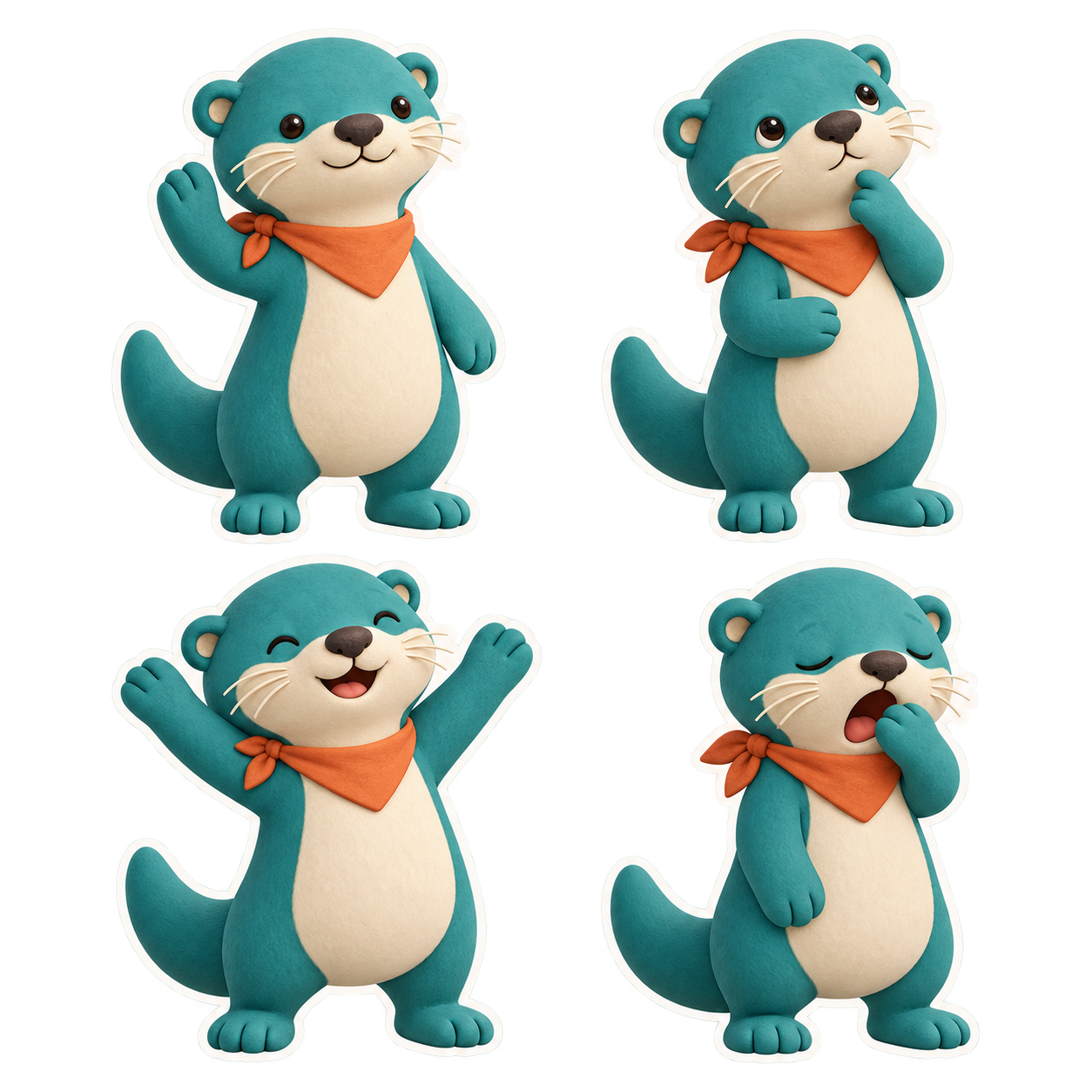
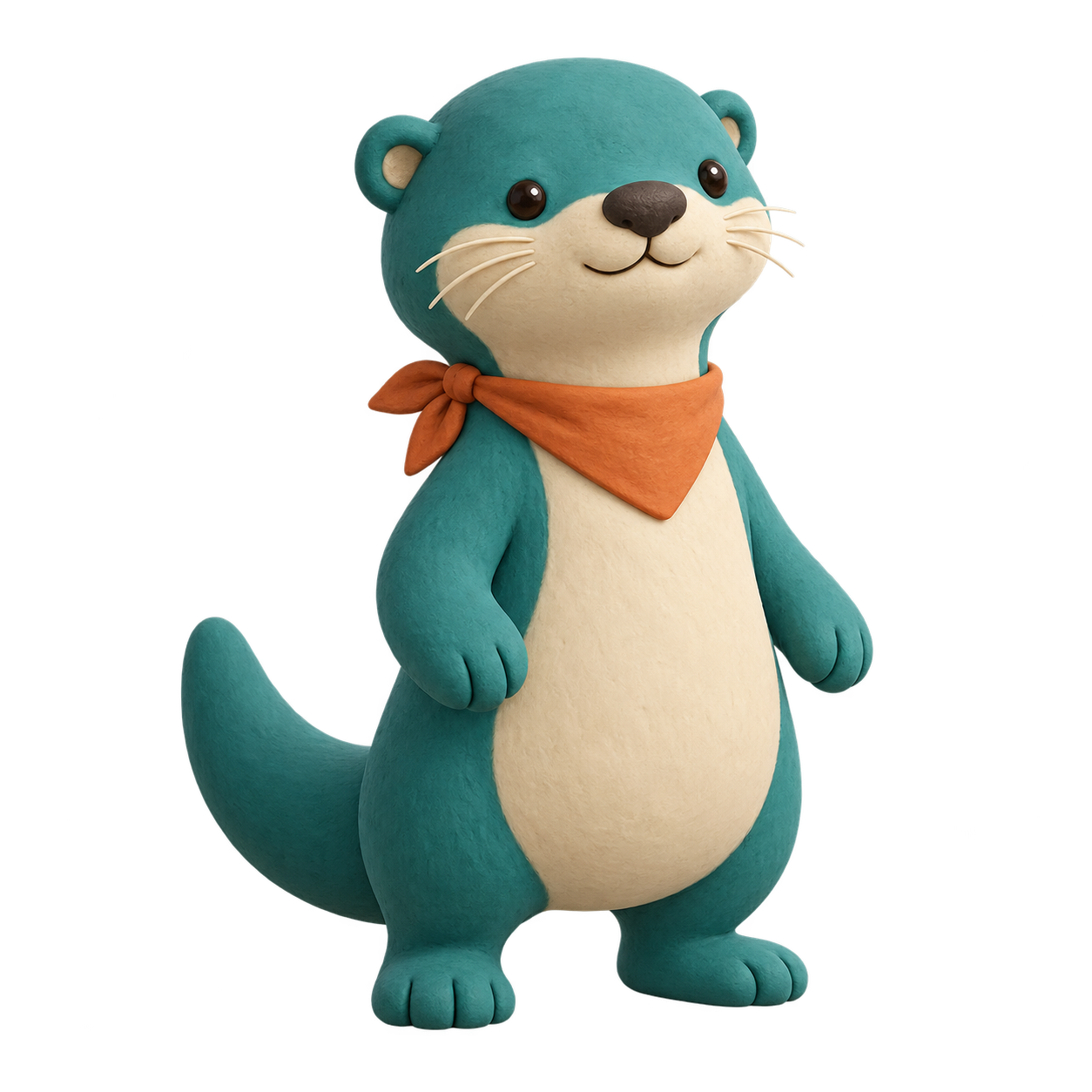
Clay Character Sticker Pack template with the original example, exact generation prompts, application guide and supporting artwork.
Replace the highlighted inputs with your details, then copy to your AI tool.
Copyable prompt
Create a coordinated set of [STICKER_COUNT] separate sticker illustrations featuring [CHARACTER_DESCRIPTION]. Use the attached [CHARACTER_REFERENCE_FILENAME] as the visual authority for the character’s silhouette, facial features, proportions, colors and signature accessory.

Depict these expressions and actions in the supplied order: [ORDERED_EXPRESSIONS_AND_ACTIONS]. Each pose must communicate its emotion clearly at a small display size. Preserve the same character identity across every sticker while varying the expression, gesture and body pose.

Use a handcrafted clay-rendered style with softly rounded forms, subtle surface texture, restrained highlights and consistent lighting from the upper left. Keep anatomy and accessories coherent. Include only [PERMITTED_PROPS_OR_NONE].

Arrange the stickers in [GRID_LAYOUT] on a genuinely transparent background. Leave generous transparent spacing between stickers so each can be extracted individually. Keep every character and accessory completely inside its own area, with no overlap or cropping.

Give each sticker a consistent narrow [OUTLINE_COLOR] outline that follows its silhouette. Do not add a background scene, floor plane, speech bubbles, words, numbers, logos or watermarks. Return one sticker sheet containing exactly the requested poses.
Prompt preview
Image · ChatGPT image generation
Make it yours Customize the prompt inputsStep by step
How to use this prompt
1
Use IMG_007_Clay_Otter_REFERENCE_v001.png as the first and only attachment. To make a new character reference, run Character_Reference_EXACT.txt without attachments, requesting an actually transparent background.
2
Paste Sticker_Sheet_EXACT.txt into a reference-capable image generator. The recorded run used ChatGPT built-in image generation with transparent_background set to true. Square ratio and grid layout were specified in the prompt; no exact size, seed or quality control was supplied.
3
Review the poses in order: top left welcoming wave; top right thoughtful chin-touch; bottom left joyful celebration; bottom right sleepy yawn.
4
Compare character proportions, muzzle, ears, colors, tail and orange neckerchief with the reference. Check that outlines are distinct, bodies are complete and no sticker touches another.
5
Confirm genuine PNG transparency in an image editor. Do not flatten onto black or white when exporting. This sheet has a verified alpha channel; a black display background is not baked into its transparent pixels.
6
For individual sticker use, select and crop each sticker in an image editor with a small transparent margin, preserving its full tail and white outline. Individual cutouts have not been created in this package. Inspect tiny stray edge pixels and clean them if required for your destination.
1254 × 1254 pixels. Inspect the example and generation record. Repeated outputs can differ; review factual details, lettering and composition before use.
Choose a prompt to copy or customize. For reference and revision prompts, follow the application guide and attach the specified image.
Create a coordinated set of [STICKER_COUNT] separate sticker illustrations featuring [CHARACTER_DESCRIPTION]. Use the attached [CHARACTER_REFERENCE_FILENAME] as the visual authority for the character’s silhouette, facial features, proportions, colors and signature accessory.
Depict these expressions and actions in the supplied order: [ORDERED_EXPRESSIONS_AND_ACTIONS]. Each pose must communicate its emotion clearly at a small display size. Preserve the same character identity across every sticker while varying the expression, gesture and body pose.
Use a handcrafted clay-rendered style with softly rounded forms, subtle surface texture, restrained highlights and consistent lighting from the upper left. Keep anatomy and accessories coherent. Include only [PERMITTED_PROPS_OR_NONE].
Arrange the stickers in [GRID_LAYOUT] on a genuinely transparent background. Leave generous transparent spacing between stickers so each can be extracted individually. Keep every character and accessory completely inside its own area, with no overlap or cropping.
Give each sticker a consistent narrow [OUTLINE_COLOR] outline that follows its silhouette. Do not add a background scene, floor plane, speech bubbles, words, numbers, logos or watermarks. Return one sticker sheet containing exactly the requested poses.
Reference images and supporting artwork
Use the filenames in the guide to choose the correct attachment. Reference creation is optional when the supplied reference is used.
Use IMG_007_Clay_Otter_REFERENCE_v001.png as the first and only attachment. To make a new character reference, run Character_Reference_EXACT.txt without attachments, requesting an actually transparent background.
Paste Sticker_Sheet_EXACT.txt into a reference-capable image generator. The recorded run used ChatGPT built-in image generation with transparent_background set to true. Square ratio and grid layout were specified in the prompt; no exact size, seed or quality control was supplied.
Review the poses in order: top left welcoming wave; top right thoughtful chin-touch; bottom left joyful celebration; bottom right sleepy yawn.
Compare character proportions, muzzle, ears, colors, tail and orange neckerchief with the reference. Check that outlines are distinct, bodies are complete and no sticker touches another.
Confirm genuine PNG transparency in an image editor. Do not flatten onto black or white when exporting. This sheet has a verified alpha channel; a black display background is not baked into its transparent pixels.
For individual sticker use, select and crop each sticker in an image editor with a small transparent margin, preserving its full tail and white outline. Individual cutouts have not been created in this package. Inspect tiny stray edge pixels and clean them if required for your destination.
VARIABLES Count: four. Character: teal clay otter with cream muzzle and belly patch, dark eyes and nose, thick tail, orange neckerchief. Actions: welcome, thinking, celebration, sleepy yawn. Props: none. Grid: 2x2. Outline: warm white. Output: transparent PNG sheet. Exact tested prompt additionally specifies pose positions, anatomy, no motion marks and requested gutter spacing.
TROUBLESHOOTING Identity drift: reattach the neutral character reference and restate the distinguishing features. Repeated poses: name the hand position, eye direction and mouth expression for each cell. Opaque background: request alpha transparency and check the file channel rather than its displayed color. Crowded rows: ask for smaller figures and larger gaps. Rough outline: request a targeted edge cleanup while preserving pose and character features.
APPROVAL AND LIMITATIONS User approval: “approved”, 1 October 2026. One reference generation and one sticker-sheet generation; no retries. No post-generation edits, crops, edge cleanup, upscaling or compositing. The sheet is 1254 x 1254 RGBA with alpha range 0–255 and 813108 fully transparent pixels. Transparency does not certify perfectly clean contours: small edge specks remain visible, and the vertical gap is considerably narrower than the requested 8 percent. The four poses remain visually separate. This is the original approved result.
PNG images are raster assets; no editable clay/3D source, animation, layered Photoshop file or application-specific sticker upload is included. All prompts and documentation are editable text. Results may vary on repeat runs.
Generation record and review status
Original example · approval recorded. This is the supplied generation history; repeated generations may differ.