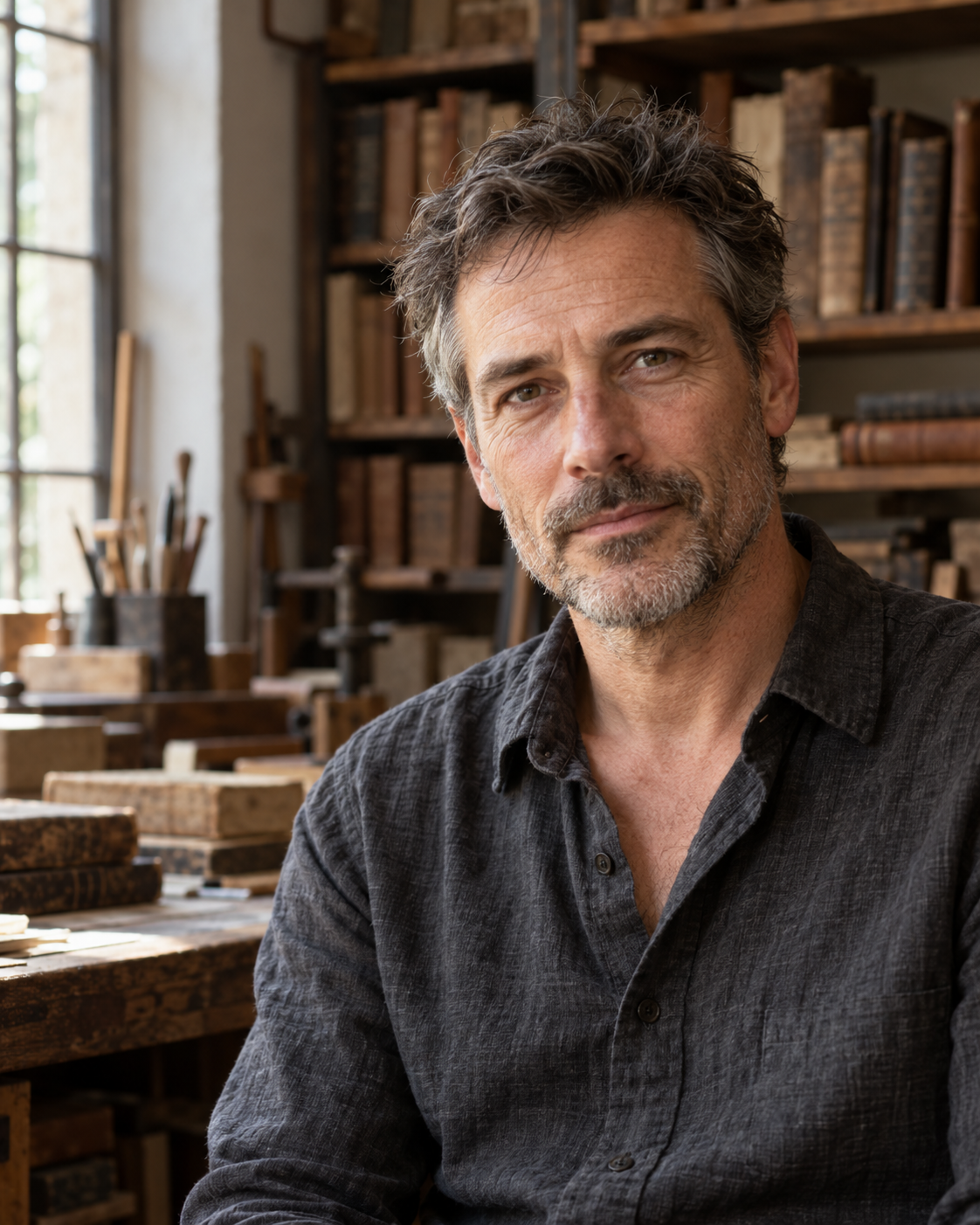
Editorial Portrait template with the original example, exact generation prompts, application guide and supporting artwork.
Replace the highlighted inputs with your details, then copy to your AI tool.
Copyable prompt
Create one photorealistic editorial portrait of [SUBJECT_DESCRIPTION] for [INTENDED_USE]. Depict the subject in [SETTING], wearing [WARDROBE], with [EXPRESSION_AND_POSE]. If a portrait reference is attached, preserve that person’s facial structure, age, skin tone, hair, and distinguishing features. If no reference is supplied, create an original fictional adult.

Compose the image in [ASPECT_RATIO] format with [FRAMING]. Position the subject at [SUBJECT_POSITION], keeping the eyes clearly visible and leaving [NEGATIVE_SPACE_POSITION] available for text added later. Use a believable camera perspective with natural facial proportions.

Light the subject with [LIGHTING]. Preserve realistic skin texture, subtle facial lines, individual hair strands, and natural fabric detail. Keep the eyes sharp and let the background fall gently out of focus while retaining enough environmental detail to establish the setting.

Use [COLOR_PALETTE] and a [MOOD] atmosphere. The portrait should feel observant and authentic, with a relaxed posture and an expression that suggests a real moment. Avoid excessive skin smoothing, exaggerated facial symmetry, artificial eye brightness, and theatrical effects.

Include only [PERMITTED_PROPS_OR_NONE]. Do not generate captions, logos, watermarks, or magazine layouts. Return one finished portrait photograph.
Prompt preview
Image · ChatGPT image generation
Make it yours Customize the prompt inputsStep by step
How to use this prompt
1
Start a new image generation with no attachments. The approved example is an original fictional adult, not a portrait of an identified person.
2
Paste the complete Exact_Test_Prompt.txt. Request one image with an opaque background. The 4:5 ratio was specified in the prompt, not a separate size control.
3
Generate, then compare the eyes, face, skin texture, clothing and workshop with the approved example. Results will vary; the same fictional identity is not guaranteed on another text-only run.
4
Review the composition for your placement. Add any headline in design software after approval.
1122 × 1402 pixels. Inspect the example and generation record. Repeated outputs can differ; review factual details, lettering and composition before use.
Choose a prompt to copy or customize. For reference and revision prompts, follow the application guide and attach the specified image.
Create one photorealistic editorial portrait of [SUBJECT_DESCRIPTION] for [INTENDED_USE]. Depict the subject in [SETTING], wearing [WARDROBE], with [EXPRESSION_AND_POSE]. If a portrait reference is attached, preserve that person’s facial structure, age, skin tone, hair, and distinguishing features. If no reference is supplied, create an original fictional adult.
Compose the image in [ASPECT_RATIO] format with [FRAMING]. Position the subject at [SUBJECT_POSITION], keeping the eyes clearly visible and leaving [NEGATIVE_SPACE_POSITION] available for text added later. Use a believable camera perspective with natural facial proportions.
Light the subject with [LIGHTING]. Preserve realistic skin texture, subtle facial lines, individual hair strands, and natural fabric detail. Keep the eyes sharp and let the background fall gently out of focus while retaining enough environmental detail to establish the setting.
Use [COLOR_PALETTE] and a [MOOD] atmosphere. The portrait should feel observant and authentic, with a relaxed posture and an expression that suggests a real moment. Avoid excessive skin smoothing, exaggerated facial symmetry, artificial eye brightness, and theatrical effects.
Include only [PERMITTED_PROPS_OR_NONE]. Do not generate captions, logos, watermarks, or magazine layouts. Return one finished portrait photograph.
Application and troubleshooting
IMG_002 — Editorial Portrait
Apply the example
Start a new image generation with no attachments. The approved example is an original fictional adult, not a portrait of an identified person.
Paste the complete Exact_Test_Prompt.txt. Request one image with an opaque background. The 4:5 ratio was specified in the prompt, not a separate size control.
Generate, then compare the eyes, face, skin texture, clothing and workshop with the approved example. Results will vary; the same fictional identity is not guaranteed on another text-only run.
Review the composition for your placement. Add any headline in design software after approval.
Adapt the editable template
Subject: fictional male book restorer, late 40s. Use: interview feature. Setting: warm, quiet bookbinding workshop. Wardrobe: charcoal linen shirt, open collar. Expression: thoughtful, relaxed, mouth closed, direct gaze, slightly turned shoulders. Requested ratio: 4:5. Requested framing: chest-up. Position: slightly right of center. Text space: upper left. Lighting: broad soft window light from camera left with ambient fill. Palette: muted brown, charcoal and warm neutrals. Mood: calm, contemplative. Props: background books and workshop furnishings only.
Replace every bracketed field before running. The exact test prompt adds specific hair, stubble and background details and asks for no readable book titles. The optional portrait-reference branch in the template has not been tested in this example.
Common fixes
Plastic skin: request natural texture, subtle lines and less smoothing. Distracting books: simplify shelves and reduce background contrast. Unnatural eyes: request balanced catchlights and natural iris brightness. Tight framing: specify exact upper-body boundaries and comfortable headroom. Poor text space: request a larger plain wall area before generating again. If using a real portrait reference, check identity against the reference; preservation is not guaranteed.
Review and disclosure
User approval: “approved”, 24 September 2026. One generation, no retries. No reference attachments. No post-generation retouching, crop, upscale or compositing. The output is a flattened PNG; the prompts and documentation are editable text. The subject is fictional and the image must not be presented as a photograph of a real interviewee.
The approved result has a wider torso crop than the requested chest-up framing. The upper-left area contains a window and workshop detail, so it is not fully blank headline space. The native image is approximately 4:5; exact dimensions are recorded in Generation_Record.json. Approval accepts this specific result and does not establish perfect compliance with every prompt instruction. No silent correction has been applied.
Generation record and review status
Original example · approval recorded. This is the supplied generation history; repeated generations may differ.
{
  "id": "IMG_002",
  "version": "v001",
  "status": "user_approved",
  "approval_text": "approved",
  "date": "2026-09-24",
  "tool": "ChatGPT built-in image generation",
  "model_version": null,
  "seed": null,
  "quality_setting": null,
  "transparent_background": false,
  "requested_ratio": "4:5",
  "actual_dimensions": [
    1122,
    1402
  ],
  "attachments": [],
  "runs": 1,
  "retries": 0,
  "postprocessing": "None; file renamed only",
  "source_basename": "exec-f29bb6c9-f836-4fb6-aaa3-4ab39e898bec.png",
  "output": "04_Images/IMG_002_Editorial_Portrait_APPROVED_v001.png",
  "sha256": "34fc69deaca66c51ef115e5d4a98bc36375520c794ed1cb8e86efe86dc48f83c",
  "limitations": [
    "Wider torso crop than requested chest-up framing",
    "Upper-left area is not fully blank",
    "Native ratio approximately 4:5; not resampled",
    "Reference-identity branch not tested"
  ]
}