
Skip to content
PromptCanva
Explore promptsCollectionsHow it worksLearnMembership
⌘ K
Favorites Login Explore Free Prompts

Instagram carousel

An Instagram carousel prompt organizes one topic into a sequence of short slides with a
hook, explanation and practical takeaway. This template pairs each slide’s copy with visual direction,
helping you create a coherent post that stays readable on a phone.

Start with a real question. End with something your audience can apply.

Copyable prompt

Create a seven-slide Instagram carousel about [TOPIC] for [AUDIENCE] . Reader problem: [PROBLEM] . Practical takeaway: [TAKEAWAY] . Brand voice: [VOICE] . Verified information: [FACTS_AND_SOURCES] . Intended CTA: [CTA] .

Use slide one for a specific, honest hook. Use slide two to explain why the problem happens. Slides three through five each teach one practical step. Slide six shows a short worked example. Slide seven summarizes the takeaway and gives one relevant action.

For every slide provide a short heading, no more than 35 words of body copy and a concrete visual direction. Keep each slide focused on one idea. Specify readable imagery or diagrams. Keep important text away from outer edges.

Also provide a caption, useful alt-text draft for each slide and three relevant hashtag suggestions. Do not invent statistics, quote unnamed experts or promise engagement results. If a claim needs evidence, mark it for review outside the publishable copy. Avoid repetitive captions and guilt-based engagement requests.
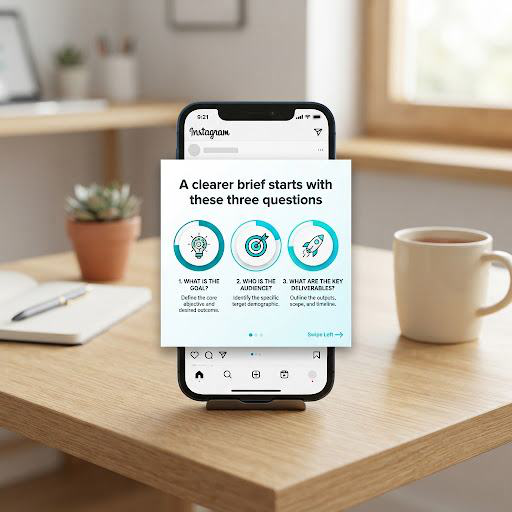
Example inputs:

Organizing a freelance client brief; designers; one decision per section; no statistics;
CTA “Save for your next brief.”

Instagram carousel displayed on a phone: A clearer brief starts with these three questions.

Slide 1 Hook: “A clearer brief starts with these three questions.”

Slide 3 Practical Step: “What must this project achieve? Write one primary outcome before listing deliverables.
“Explain the new service” gives your design a job to do. Visual: a brief with one highlighted objective.

Visual direction: A brief with one highlighted objective and clean diagram.

Common Fix

If slides feel crowded, cut secondary points instead of shrinking the font.

Standard operating procedure

How to run this template in production

1

Choose one takeaway.

Define the single core problem and takeaway before generating. Avoid trying to solve multiple unrelated challenges in one carousel.

2

Generate slide copy.

Run the structured prompt to generate short headings, tight under-35-word slide copy, concrete visual directions, caption, and alt-text drafts.

3

Design and inspect at phone size.

Lay out the slides in your design tool and review at 100% phone scale to ensure typography and diagrams remain instantly legible.

Frequently Asked Questions

Does this generate the slide images?

It supplies visual directions; use them in your design workflow.

Can I change the slide count?

Yes. Preserve one clear idea per slide and a useful final takeaway.

Related

/categories/social-media/

Explore All Social Media Prompts

Browse 120+ tested hooks, carousels, threads, and caption frameworks.

›
/prompts/short-video-script/

Short Video Script Template

Turn short-form content ideas into high-retention video scripts.

›

PromptCanva

See the result. Make it yours. Explore AI prompt templates for visuals, videos, marketing, and everyday creative work.

Explore

All promptsFree promptsCollectionsImage promptsVideo prompts

Learn

How it worksGuidesQuality standardsHelp

Company

AboutContactRequest a promptMembership

Legal

TermsPrivacyPrompt licenseCookies
© 2026 PromptCanva. AI tool and platform names belong to their respective owners. PromptCanva is independent unless a specific relationship is disclosed.