
Skip to content
PromptCanva
Explore promptsCollectionsHow it worksLearnMembership
⌘ K
Favorites Login Explore Free Prompts

YouTube title and description

A YouTube title and description prompt turns your transcript or approved outline into accurate video metadata.
This template develops several title angles, a concise opening description and relevant supporting details while
keeping the hook tied to what viewers will actually see inside.

❝Give the right viewer a clear reason to click and stay.

Copyable prompt

Create YouTube metadata for [VIDEO_TOPIC] using [TRANSCRIPT_OR_APPROVED_OUTLINE] as the content authority. Audience: [AUDIENCE]. Main search intent: [SEARCH_INTENT]. Primary phrase: [PRIMARY_PHRASE]. Channel voice: [VOICE]. Approved links: [LINKS].

Write six title options across practical, curiosity-led and story-led angles. Keep every title faithful to the video. Include a character count for each and identify the clearest option with one sentence of reasoning. Avoid unsupported superlatives, fabricated stakes and promises the video does not deliver.

Open the description with two sentences explaining the video’s value. Add a short summary, supplied links and one relevant CTA. Include up to three focused hashtag suggestions. Use the primary phrase naturally.

Create chapters only when accurate timestamps are supplied in [VERIFIED_TIMESTAMPS]. Otherwise omit chapters and ask for a timestamped transcript in separate editor notes. Do not invent upload dates, sponsors, credits, cast identities or performance claims. For a series, preserve [OFFICIAL_SERIES_AND_EPISODE_NAMES]. Keep all unresolved facts outside the publishable description.
Example inputs:

Lighting Series EP-03

> Tutorial demonstrating three product-lighting setups; beginners; tabletop lamp,
reflector and window; no timestamps supplied.

Quality guard preflight note

Verify transcript accuracy before generating metadata. Omit chapters without exact timestamps; never fabricate subscriber claims or artificial curiosity hooks.

Verified output excerptCreator Preview
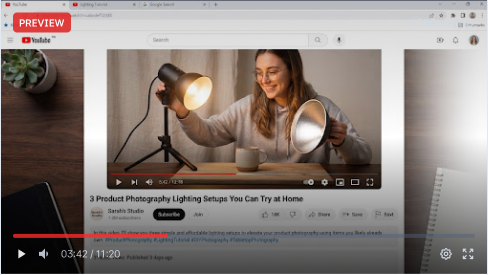
Illustrative YouTube preview of a creator demonstrating product photography lighting with tabletop lamps.
Selected Angle: Practical Hook63 chars (Under 70 Limit)

3 Product Photography Lighting Setups You Can Try at Home

Illustrative output excerpt: Title:

Learn three ways to light a small product using a window, a tabletop lamp and a simple reflector. This tutorial shows where to place each light and how the shadows change.

#ProductPhotography   #LightingTutorial   #StudioLighting
Common Fix: If the title exaggerates, replace the promised result with the specific demonstration shown.

Production Runbook: 3-Step Execution

1

Supply actual video content

Establish verified facts from your transcript or approved outline before writing metadata. Lock verified
content authority.

2

Compare title angles

Generate 6 distinct angles: practical, curiosity, and story-led. Review character counts against 70-character truncation limits.

3

Verify every name, link and claim

Audit description links, confirm hashtags, and verify timestamps if adding chapters. Keep unproven claims outside the text.

Frequently Asked Questions

Q:Will this guarantee more views?

No. It helps draft clearer, relevant metadata; performance requires
observation.

Q:Can it create chapters from a summary?

A summary lacks reliable timing. Supply verified timestamps.

/categories/social-media/

Explore All Social Media Prompts

Browse 120+ tested hooks, carousels, threads, and caption frameworks.

›
/prompts/short-video-script/

Short Video Script Template

Turn short-form content ideas into high-retention video scripts.

›

PromptCanva

See the result. Make it yours. Explore AI prompt templates for visuals, videos, marketing, and everyday creative work.

Explore

All promptsFree promptsCollectionsImage promptsVideo prompts

Learn

How it worksGuidesQuality standardsHelp

Company

AboutContactRequest a promptMembership

Legal

TermsPrivacyPrompt licenseCookies
© 2026 PromptCanva. AI tool and platform names belong to their respective owners. PromptCanva is independent unless a specific relationship is disclosed.