
Cinematic establishing shot

An establishing shot introduces the location, scale and atmosphere of a scene before
closer action begins. This AI video prompt defines stable landmarks, a single camera move and
environmental motion so your opening communicates where the audience is and what matters.

“Give viewers a destination to notice and an atmosphere to feel.”

Copyable prompt • Production Ready v3.2

Create one cinematic establishing shot for [PROJECT_CONTEXT] . Location: [LOCATION_DESCRIPTION] . Use [LOCATION_REFERENCE_IF_AVAILABLE] to preserve geography, architecture and scale. Duration: [DURATION_SECONDS] . Aspect ratio: [ASPECT_RATIO] . Time and weather: [TIME_AND_WEATHER] .

Begin with [OPENING_COMPOSITION] . In the opening frame, place [PRIMARY_LANDMARK] at [FRAME_POSITION] and [SECONDARY_LANDMARK] at [RELATIVE_POSITION] . Use one [CAMERA_MOVE] to reveal [STORY_INFORMATION] . End on [ENDING_COMPOSITION] , suitable for a hard cut to [NEXT_SHOT_DESCRIPTION] .

Keep world geography, light direction and architectural proportions stable. Let the horizon and landmarks’ screen positions change consistently with the specified camera movement. Environmental movement is limited to [PERMITTED_MOTION] . Keep wind direction consistent. Do not introduce characters, vehicles, signs or structures beyond the brief. Avoid changing building shapes, elastic terrain, sudden camera acceleration and unnecessary spectacle.

Keep invented locations fictional. For real locations, preserve referenced landmarks.

Return one continuous shot without transitions, text overlays or watermarks. Keep the camera movement restrained and spatially coherent.
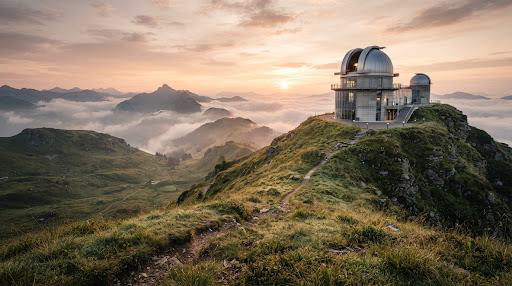
Visual Preview • 16:9 Establishing ShotSpatial Geometry Lock
PDF reference frame of a hilltop observatory at dawn with an uphill path●   REC 00:00:08:004K / HD

[ HORIZON & LANDMARK LOCK: DOME UPPER-CENTER ]

●  Slow Forward Drift • Restrained Pace0:04.8 / 0:08.0

[APPROVED_ESTABLISHING_SHOT] :

foreground grass moves consistently in the breeze; the camera approaches the observatory without altering the path or dome. No video has been rendered.

Tool req.
Video Gen + Ref
Aspect ratio
16:9 Widescreen
Geometry guard
Zero Drift
01

Define landmarks.

Establish primary and secondary reference points in the opening composition to ground spatial scale and elevation.

02

Specify one reveal.

Constrain camera path to a single fluid move (e.g. slow forward drift, crane-down, or lateral tracking) to prevent coordinate disorientation.

03

Check geography across the shot.

Verify horizon line consistency, lighting vector alignment, and architectural permanence before cutting to subsequent action shots.

Frequently Asked Questions

Can I use this for a real city?

Yes, with suitable references and a review of recognizable landmarks.

How do I connect it to the next shot?

Match light direction, screen direction and the destination’s position.

Establishing shot reference

This is the still preview supplied in the design. No video has been rendered. Copy the prompt, replace its bracketed fields, and run it with your location references in a video generation tool.