
Cinematic product photography

A cinematic product photography prompt describes the product, reference image, setting, lighting
and composition needed for a dramatic hero image. This template prioritizes product identity and
leaves room for your campaign headline, so the result can support an actual design.

Start with your real product. Give it atmosphere without losing what makes it recognizable.

Copyable prompt

Create one cinematic product photograph for [PRODUCT] using [REFERENCE_IMAGE] as
the authority for its shape, proportions, materials, colors, packaging and existing
branding.

Audience: [AUDIENCE] . Intended placement: [PLACEMENT] . Aspect ratio:
[ASPECT_RATIO] .

Place the product in [SETTING] with [SURFACE_AND_PROPS] . Use [LIGHTING] to
emphasize [KEY_PHYSICAL_DETAIL] . Build the atmosphere through believable light,
reflections and depth, without changing the product. Keep the main subject sharp and
the background controlled. Use believable edge highlights without clipping bright
areas or crushing important shadow detail. Leave [NEGATIVE_SPACE_POSITION] clear
for a headline added later.

Preserve visible label spelling and logo placement. Do not add badges, ingredients,
accessories, performance claims or decorative text. Do not invent details absent from
the reference. Keep shadows and reflections plausible. Avoid floating packaging and
duplicate objects.

Return one image with the supplied product identity preserved.
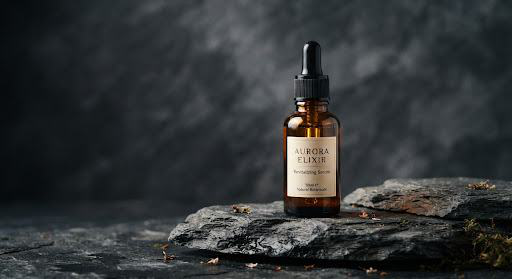
Example amber serum bottle standing on charcoal stone with dramatic side lighting
Production briefActive Reference

[APPROVED_PRODUCT_PHOTO]: one upright amber bottle at lower right, a controlled gold highlight on the glass and soft shadow on charcoal stone. Preserve the supplied label. This image has not been rendered.

Tool Requirements
Ref image input +
GenAI
Output Resolution
1024 × 1024 px
Contrast Guard
No Highlight Clipping

How to run this template in production

1

Upload your reference.

Ensure high resolution with visible labels and accurate material textures. Clean white packshots or transparent PNGs provide the strongest baseline identity.

Uncompressed PNG / WebP recommended
2

Replace every variable.

Specify target audience, lighting angle, surface props, and negative space orientation ([NEGATIVE_SPACE_POSITION]).

All brackets must be replaced
3

Check branding & geometry.

Audit bottle geometry, reflections, shadow falloff, and typography fidelity before publishing to client campaigns or e-commerce storefronts.

Pass final visual QA check

Frequently Asked Questions

Can I use it without a reference?

Yes, for an invented product concept. Supply a reference for an existing product.

Will the logo always stay accurate?

No. Inspect it and composite the approved logo manually when needed.